Ever wondered why your hard work is invisible to people, even though Google visits? It’s a big problem for many site owners. They think if a bot visits, their pages will show up in search results. But, search engines work in a more complex way today.

This guide will help you understand why your site is crawled but not indexed in Google. We’ll show you how to fix these problems. You’ll learn how to make your pages visible in 2026. By knowing how search bots and your site work together, you can get more visitors.
Key Takeaways
- Understand the critical difference between search engine discovery and actual inclusion in results.
- Identify common technical roadblocks that prevent your pages from appearing in search.
- Learn how to optimize your site architecture for better search engine communication.
- Discover actionable steps to improve your visibility in the 2026 search landscape.
- Master the balance between content quality and technical performance for better rankings.
Understanding the Google Indexing Process
To fix website indexing, you need to know how Googlebot works. Googlebot checks your site to see if it’s worth including in its index. Knowing this helps you make your site more visible and better.

How Google Discovers and Crawls Your Content
Google finds new content by following links and using XML sitemaps. When Googlebot visits a page, it looks for new links to explore. This helps it understand the web better.
XML sitemaps are like a map for Googlebot. They help it find new sites or pages with few links. If you have website crawling and indexing problems, check your sitemap first.
The Difference Between Crawling and Indexing
Crawling and indexing are two different steps. Crawling is when Googlebot downloads a page to learn about it. Indexing is when Google analyzes the page and adds it to its database.
Many people get these terms mixed up. But they are important steps in how Google works. A page can be crawled but not indexed if it’s not good enough or breaks rules. Knowing this helps you understand why your page might not be indexed.
If a page is crawled but not indexed, Google has seen it but won’t show it in search results. This might be because the content is thin, there are duplicates, or it breaks rules. To fix this, you need to know where your page is stuck in the process.
Decoding Google Search Console Status Reports
If your website isn’t showing up on Google, start with your dashboard’s status reports. Google Search Console shows why your pages might not be in search results. By looking at these status codes, you can find out what’s stopping your content from being seen.

What Crawled – Currently Not Indexed Means
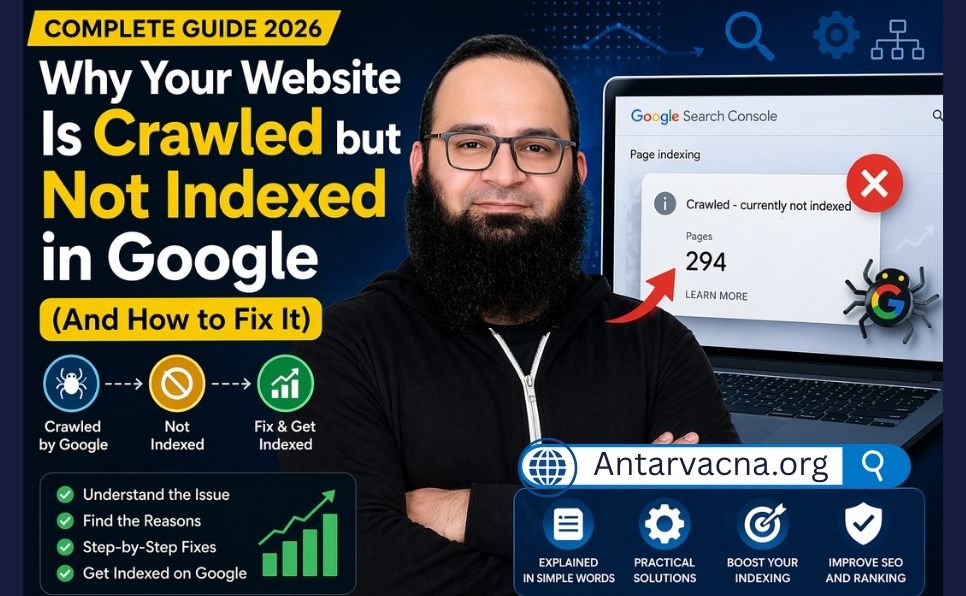
“Crawled – currently not indexed” means Googlebot visited your page but didn’t add it to the index. This usually means the content isn’t good enough or doesn’t match what users want. If your pages aren’t up to Google’s standards, they might not show up.
Google might also skip your page if it finds the same content elsewhere. Make sure your pages offer something new and useful. Better content can help Google include your pages in their searches.
What Discovered – Currently Not Indexed Means
“Discovered – currently not indexed” means Google found your URL but hasn’t crawled it yet. This often happens when Google can’t crawl as much as it wants. If you have a lot of pages, Google might wait to avoid overloading your server.
These pages are just waiting in line. You can help by making your site easier to navigate and handling more traffic. By removing low-quality pages, you let Google focus on your best content.
The Crawled Currently Not Indexed Fix and Diagnostic Steps
When your pages don’t get indexed, a detailed check is needed. Look at the data from search engines closely. This helps find why your content isn’t showing up in searches.
Analyzing Your Coverage Report in Google Search Console
The Google Search Console is your main tool for fixing indexing problems. Start by going to the “Pages” report. It shows why some URLs aren’t indexed.
Look for the “Crawled – currently not indexed” status in the report. This means Googlebot visited but didn’t index it. Knowing this helps fix not indexed pages.
Identifying Patterns in Non-Indexed Pages
After getting your data, find out if it’s a big problem or just a few pages. Group non-indexed URLs by type or location. This helps find common issues.
For example, maybe only tag pages or old blog posts are not indexed. If it’s just a few areas, you can fix those without changing everything. Here’s a table to help you sort out indexing problems.
| Status Category | Primary Meaning | Recommended Action |
|---|---|---|
| Crawled – Not Indexed | Page visited but skipped | Improve content quality |
| Discovered – Not Indexed | URL found but not crawled | Check crawl budget and links |
| Excluded by Noindex | Tag explicitly blocks indexing | Remove tag if indexing is desired |
| Duplicate Content | Canonical tag points elsewhere | Verify canonical settings |
Sorting your findings helps plan your SEO work. Keep watching these patterns to avoid future problems. This keeps your site visible in searches for a long time.
Technical SEO Factors Preventing Indexing
When your pages don’t show up in search, it’s often because of a hidden tech issue. These problems stop your content from being seen in search results. Fixing these issues is key to making your site work better.
Checking Robots.txt Directives
The robots.txt file controls who can see your website. If it’s wrong, it might block Google from seeing your important pages. Make sure it’s set up right to let Google see your site.
It’s important to check your robots.txt file often. A small mistake can keep search engines from finding your content. Use Google Search Console tools to make sure your pages are open to Google.
Managing Canonical Tags and Duplicate Content
Duplicate content can confuse search engines. They might ignore pages that are the same. Canonical tags tell Google which page is the main one. This helps your site rank better.
If you have different versions of a page, like printer-friendly ones, you need canonical tags. Without them, Google might not see these pages. Using these tags correctly is important to fix indexing problems.
The Role of Noindex Meta Tags
Noindex meta tags tell search engines not to index a page. They’re good for private pages but can be a mistake on public ones. Check your site to make sure these tags are not on pages you want to rank.
Fixing website indexing is easy if you find and remove noindex tags. Just update your site to let Google crawl and index your pages again. This simple step can solve many indexing problems.
| Technical Factor | Primary Impact | Action Required |
|---|---|---|
| Robots.txt | Blocks crawler access | Update disallow rules |
| Canonical Tags | Causes duplicate issues | Set preferred URL |
| Noindex Tags | Prevents page indexing | Remove meta tag |
Improving Content Quality to Encourage Indexing
If your pages are not indexed, it might be because of low-quality content. Google likes pages that are very useful. Thin content often doesn’t meet these standards.
By focusing on quality, you can fix not indexed pages. This makes sure your site shows up in search results.
Addressing Thin or Low-Value Content
Thin content is pages with little or no real information. This includes doorway pages or auto-generated text. These pages are not good for visitors and don’t get indexed often.
Look at your site to find these pages. You can either remove them or add more useful information.
Making one big guide from many thin pages is a good idea. This makes your site stronger and more likely to get indexed. Remember, quality is more important than quantity.
The Importance of Unique Value Propositions
Your content must be different to stand out online. Just copying others won’t help. You need to share new insights, data, or a unique view.
When your content is truly unique, Google sees it as valuable. This is key for success. It tells search algorithms your pages are important.
Optimizing Content for User Intent
Your content must match what users are looking for. If someone searches for a solution, your page should give a clear answer. Knowing what users want helps you write better.
When you match user intent well, your pages are more likely to be indexed and ranked. Use the table below to check your content and find ways to improve.
| Content Feature | Low-Quality Characteristics | High-Quality Characteristics |
|---|---|---|
| Word Count | Under 300 words | Comprehensive and detailed |
| Originality | Copied or spun text | Unique insights and data |
| User Intent | Irrelevant to search query | Directly answers the query |
| Engagement | High bounce rate | Encourages interaction |
Optimizing Internal Linking Structures
A good internal linking plan helps search engines find your site. It makes a clear path for Googlebot to follow. This helps your site get indexed better.
This structure makes sure your content is found and valued. It’s based on how well it meets your users’ needs.
How Internal Links Signal Page Importance
Internal links are like roads that show which pages are important. They help spread out authority across your site. This makes search engines notice your key pages more.
Link your most important content from your homepage or main menus. This helps your main pages stay visible in search results. It’s important for keeping your site indexed well.
Fixing Orphaned Pages
Orphaned pages are hidden on your site without links. Search engines can’t find them. Finding and linking these pages is key to fixing indexing issues.
Use a site crawler tool to find these pages. Then, link them to your site’s content. This makes your content more visible and reaches your audience better.
Managing Website Performance and Server Issues
Your server is like a quiet engine that helps your site show up in search results. If it doesn’t work right, you might see big problems with crawling and indexing. This stops your content from showing up in search.
Keeping your hosting stable lets search engine bots visit your pages easily.
Impact of Server Errors on Googlebot
Googlebot often runs into server problems that make it stop crawling. If your server shows 5xx status codes, it means it can’t handle a request. This causes big delays in indexing.
These errors stop the bot from seeing your content. This makes it hard for the search engine to process your pages.
Stable connections are key. If your site is always down or unstable, the bot might not visit as often. This means it might choose other sites over yours.
Checking your server logs often is important. It helps fix indexing problems.
Optimizing Page Load Speed for Crawlers
Page speed is important for both users and search engines. A slow page uses up more of your crawl budget. This means the bot waits longer to find new content.
By making your code faster and servers quicker, you can solve indexing problems. This is because technical issues slow things down.
| Server Issue | Impact on Googlebot | Recommended Action |
|---|---|---|
| 503 Service Unavailable | Temporary crawl suspension | Check server load and capacity |
| High TTFB (Time to First Byte) | Reduced crawl efficiency | Optimize database queries |
| Connection Timeouts | Incomplete page indexing | Upgrade hosting infrastructure |
| 404 Not Found | Removal from index | Implement proper redirects |
Fixing your server makes it easier for crawlers to get around. By working on these tech parts, your site stays open for indexing. Keeping your hosting in good shape stops future problems.
Leveraging XML Sitemaps for Better Visibility
Want to know how to get your website indexed by Google? Start with your XML sitemap. It’s like a map for search engine bots. It shows them where to find your best content.
Best Practices for Sitemap Submission
Submit your sitemap through Google Search Console to help search engines find your site. Make sure it’s clean, up-to-date, and error-free. This keeps search bots happy:
- Keep your sitemap file size under 50MB and limit it to 50,000 URLs.
- Use UTF-8 encoding to prevent character errors during the crawl process.
- Submit your sitemap URL directly in the Sitemaps report within Google Search Console.
- Update your sitemap automatically whenever you publish new, high-quality content.
Prioritizing Important Pages in Your Sitemap
Not all pages are created equal. Focus on the most important ones to catch search engine attention. This saves time for bots and boosts your site’s ranking.
Highlight your best content, like product pages and main landing pages. Remove thin content to show Google what’s most valuable. This way, your key content gets the spotlight it deserves.
External Signals and Backlink Authority
External signals show search engines you’re trustworthy. When big sites link to you, they share their trust. This helps your site get seen by more people.
How Backlinks Influence Crawl Budget
Crawl budget is how many pages Googlebot visits in a short time. Good backlinks make your site seem more important. This means Googlebot visits your site more often.
But, if your site doesn’t get many links, Googlebot might not visit as much. This can make it hard for new content to get seen.
Building Authority to Speed Up Indexing
Getting backlinks is key to being seen on Google. Make content that people want to share. As your site gets more links, Google will visit more often.
If your site isn’t showing up on Google, check your backlinks. Ask for links from sites that matter to you. This helps Google know your site is important.
Advanced Troubleshooting for Persistent Indexing Issues
When basic steps don’t work, you need a detailed plan. Deeper technical problems need a careful look. Use special tools to find and fix hidden issues.
How Long Does It Take to Fix Crawled – Currently Not Indexed?
Fixing this issue can take anywhere from a few days to several weeks depending on content quality, internal linking, and website authority. Consistent updates and improvements can speed up the process.
Using the URL Inspection Tool Effectively
The URL Inspection Tool gives you real-time info on a page. Just type the URL into Google Search Console’s search bar. It shows how Googlebot sees your page, including any issues.
If it says a page isn’t indexed, check the “Coverage” section for error codes. This detailed info helps fix the problem. Look for server issues, redirect problems, or blocked scripts.
Requesting Re-indexing After Implementing Fixes
After fixing technical issues, tell Google to check the page again. Go back to the URL Inspection Tool and click “Request Indexing.” This puts your URL at the top of the list for the next crawl.
Don’t keep asking for the same page to be indexed. It won’t help. Instead, make sure your site is organized and your sitemap is up-to-date. This helps fix problems better over time.
Monitoring Progress and Adjusting Strategy
After asking for a re-crawl, wait for Googlebot to work on it. Watch the “Coverage” report in Search Console for weeks. If it doesn’t change, you might need to check your content or links.
Good webmasters keep working on indexing. Keep track of your changes to find what works. Regular checks are key to fixing problems and keeping your site visible.
Conclusion
To get to the top, you need both tech skills and great content. You now know how to find and fix why your site isn’t on Google.
Small changes can make a big difference. Fixing crawl errors and making your site easier to navigate helps a lot. This way, search engines will find and like your pages more.
Keep checking your site’s health regularly. Use Google Search Console to see how you’re doing and make things better. This way, you can make sure your site shows up in Google.
Start checking your site’s indexing status today. Focus on making your site better and more visible. Begin now to get more people to visit your site.