If you’re planning to launch a website, you’ve probably come across two terms that get used interchangeably but actually mean completely different things: domain name and web hosting. Many beginners assume buying one automatically gives them the other — but that’s not how it works, and misunderstanding this can lead to wasted money or a website that simply doesn’t go live.
In this guide, we’ll break down exactly what each term means, how they work together, and why you need both to build a functioning website.
What Is a Domain Name?
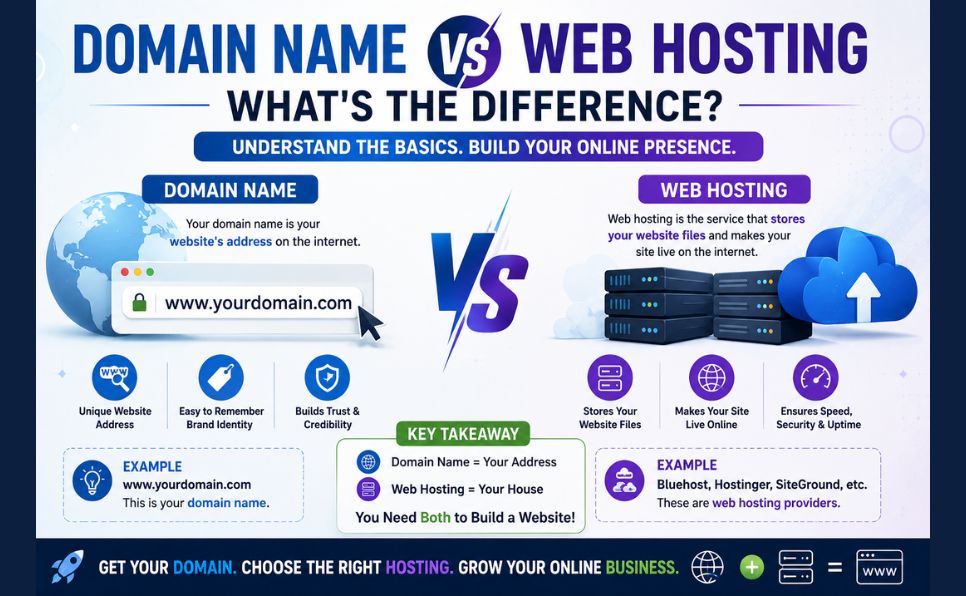
A domain name is your website’s address on the internet — the text people type into their browser to find you, like antarvacna.org. Think of it as the name of your shop.
Technically, a domain name is a human-readable label that points to an IP address (a string of numbers that computers use to identify servers). Instead of remembering something like 192.0.2.10, people just type your domain name, and the Domain Name System (DNS) translates it into the correct server address behind the scenes.
Domain names are registered through a domain registrar and are typically renewed annually. You don’t technically “own” a domain forever — you lease the rights to use it for as long as you keep renewing it.
Key Facts About Domain Names:
- They consist of two main parts: the name (e.g., “antarvacna”) and the extension or TLD (e.g., “.org”, “.com”, “.net”)
- They must be unique — no two websites can have the exact same domain name and extension
- They are managed and regulated globally through a system overseen by the Internet Corporation for Assigned Names and Numbers (ICANN)
What Is Web Hosting?
Web hosting is the actual storage space where your website’s files, images, databases, and content live. If a domain name is your shop’s address, web hosting is the physical building — the land, the shelves, and the storage where your products (your website’s content) actually sit.
A hosting provider owns and maintains servers — powerful computers that are always connected to the internet — and rents out space on them so your website files can be accessed by visitors 24/7.
If you’ve already read our guide on What Is Web Hosting, you’ll know there are several types of hosting — shared, VPS, cloud, and dedicated — each offering different levels of performance, control, and price. You can also check our detailed comparison of Shared vs VPS vs Cloud Hosting to understand which option suits your needs.
The Core Difference — Explained Simply
| Domain Name | Web Hosting | |
|---|---|---|
| What it is | Your website’s address | Where your website’s files are stored |
| Real-world analogy | Your shop’s street address | The actual shop building and storage |
| Purchased from | Domain registrar | Hosting provider |
| Renewal cycle | Usually yearly | Monthly or yearly |
| What happens if you don’t have it | Visitors can’t find your site by name | Your website has nowhere to “live,” so it can’t go online |

Without a domain name, people can’t easily find your website. Without hosting, there’s no actual website to find — just a name pointing to nothing.
Why You Need Both
This is the part that confuses most beginners: you cannot run a live website with only a domain name or only hosting.
- If you buy a domain name but never purchase hosting, your website simply won’t exist online — the address exists, but there’s nothing behind it.
- If you buy hosting but never register a domain, your site might technically be live, but visitors would have to access it through a complicated server IP address instead of a simple, memorable name.
To launch a real website, you need to:
- Register a domain name through a domain registrar
- Purchase a hosting plan from a web hosting provider
- Point your domain to your hosting account by updating your domain’s nameservers or DNS records
- Upload your website files to your hosting server
Many hosting providers — including WHMCS-powered hosting companies — let you manage both your domain and hosting from a single dashboard, which simplifies this process significantly. If you’re curious how that billing and management system works, take a look at our article, What Is WHMCS.
Can You Buy Domain and Hosting From the Same Company?
Yes, and in fact, many people do exactly this for convenience. Most hosting companies also act as domain registrars (or partner with one), so you can purchase your domain name and hosting plan in a single checkout and have them automatically connected.
That said, some experienced website owners prefer to register their domain separately from their hosting provider. This is a common practice for an important reason: if your hosting provider ever has issues, goes down, or you decide to switch companies, your domain isn’t locked into that same account. You retain full control over your most valuable digital asset — your domain name — independently.
Common Beginner Mistakes to Avoid
- Assuming a domain purchase includes hosting. It doesn’t, unless it’s explicitly bundled in the plan you chose.
- Letting a domain expire. If you don’t renew on time, someone else can register it — and you could lose your brand identity permanently.
- Choosing hosting based on price alone. Cheap hosting can mean slow load times, poor uptime, or weak security — all of which hurt your website’s credibility and search engine rankings. For a deeper breakdown of official documentation on DNS and how domains route traffic to hosting, the Internet Corporation for Assigned Names and Numbers (ICANN) offers helpful resources at icann.org.
- Ignoring DNS propagation time. After connecting your domain to your hosting account, changes can take anywhere from a few minutes to 48 hours to fully take effect worldwide.
Final Thoughts
A domain name and web hosting are two separate but equally essential pieces of the same puzzle. The domain is your identity — the name people remember and type in. The hosting is the engine — the actual infrastructure that keeps your content live, secure, and accessible around the clock.
Understanding this distinction early on will save you time, money, and confusion as you build your online presence. Once you have both pieces in place and correctly connected, your website is ready to go live for the world to see.
Want to explore hosting options further? Check out our related guides: What Is Web Hosting, Shared vs VPS vs Cloud Hosting, and What Is WHMCS.