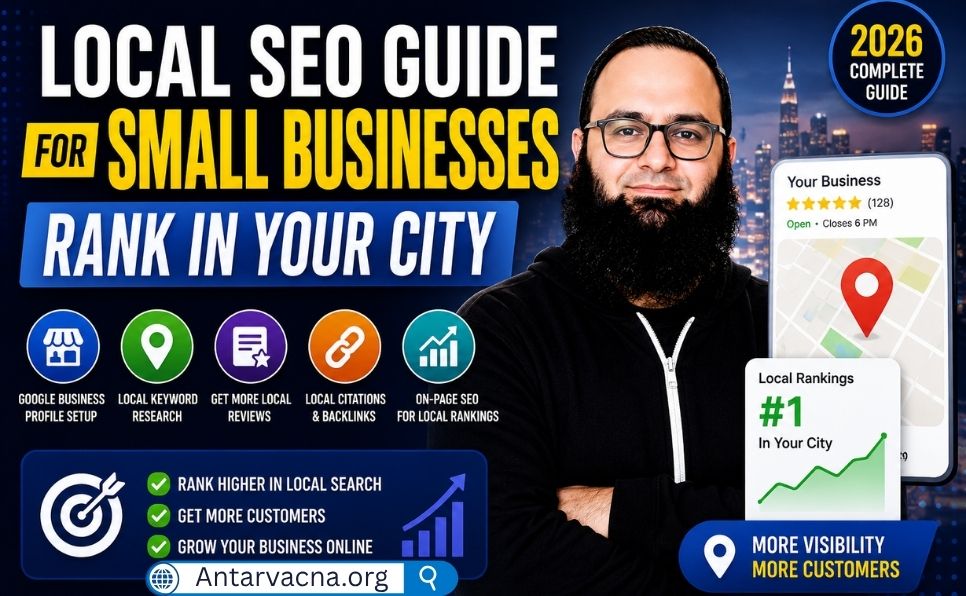
When someone nearby searches “best coffee shop near me” or “plumber in [city name]” — does your business show up?
If not, you’re losing customers to competitors who have figured out local SEO.
Local SEO is the process of optimizing your online presence so your business appears in Google search results when people in your area search for products or services you offer. For small businesses, it’s one of the highest-return marketing investments available — and most of it is completely free.
In this complete guide, you’ll learn:
- What local SEO is and how it works
- How to set up and optimize your Google Business Profile
- How to build local citations and get listed in directories
- How to get more reviews (and why they matter so much)
- On-page local SEO techniques for your website
- How to build local backlinks
- A complete local SEO checklist
Let’s get started. 👇
What Is Local SEO?
Local SEO is the practice of optimizing your online presence to attract more business from relevant local searches on Google and other search engines.
When someone searches for a product or service “near me” or in a specific city, Google shows three types of results:
- Google Maps Pack (Local Pack) — the box showing 3 local businesses with maps, ratings, and contact info
- Organic results — regular website listings below the map pack
- Paid ads — sponsored listings at the top (not SEO)
Local SEO focuses on getting your business into both the Map Pack and the organic results for local searches.
Who Needs Local SEO?
Local SEO is essential for any business that:
- Serves customers in a specific geographic area
- Has a physical location (store, office, clinic, restaurant)
- Provides services in a specific city or region (plumber, electrician, cleaner)
- Wants to attract foot traffic or local phone calls
Examples: Restaurants, dentists, lawyers, real estate agents, gyms, retail stores, freelancers serving local clients, contractors, salons, and more.

How Google Determines Local Rankings
Google uses three main factors to rank local businesses:
| Factor | What It Means | Weight |
|---|---|---|
| Relevance | How well your business matches the search query | High |
| Distance | How close your business is to the searcher | High |
| Prominence | How well-known and trusted your business is online | High |
You can’t control distance — but you can significantly improve relevance and prominence through local SEO.
Step 1: Set Up and Optimize Your Google Business Profile
Google Business Profile (GBP) — formerly Google My Business — is the single most important tool for local SEO. It’s 100% free and directly controls how your business appears in Google Maps and the Local Pack.
How to Create a Google Business Profile:
- Go to Google Business Profile
- Sign in with your Google account
- Click “Manage now” → “Add your business”
- Enter your business name
- Select your business category (choose the most accurate primary category)
- Add your location (if you have a physical address)
- Add your service area (if you serve customers at their location)
- Add your phone number and website
- Verify your business (Google sends a postcard, calls, or emails)
How to Fully Optimize Your Google Business Profile:
Business Name Use your exact, real business name. Do NOT add keywords to your business name — this violates Google’s guidelines and can get your listing suspended.
- ❌ “John’s Plumbing — Best Plumber in Chicago”
- ✅ “John’s Plumbing Services”
Primary Category Choose the most specific category that describes your main business. This is the most important GBP ranking factor after proximity.
Secondary Categories Add up to 9 additional categories that describe other services you offer.
Business Description Write a 750-character description that:
- Describes what your business does
- Mentions your city/service area naturally
- Includes your most important keywords naturally
- Does NOT include links or promotional language
Business Hours Keep hours accurate and updated — especially for holidays. Inaccurate hours lead to negative reviews and lost customers.
Phone Number Use a local phone number (not a toll-free number) — it reinforces your local presence.
Website URL Link to your website homepage or a specific landing page optimized for local searches.
Photos and Videos Businesses with photos receive significantly more clicks and direction requests. Add:
- Exterior photo (so people recognize your location)
- Interior photos
- Product/service photos
- Team photos
- At least 10 high-quality photos to start
Services and Products Add every service or product you offer with descriptions and prices where applicable. This helps Google match your listing to more relevant searches.
Q&A Section Proactively add frequently asked questions about your business. This gives Google more content to index and helps potential customers immediately.
Posts Use Google Business Profile Posts to share:
- Special offers and promotions
- New products or services
- Events
- Business updates
Posts appear in your GBP listing and show Google that your profile is actively managed.
Step 2: Build Local Citations (NAP Consistency)
A local citation is any online mention of your business’s Name, Address, and Phone number (NAP). Citations help Google verify that your business is legitimate and located where you say it is.
Why NAP Consistency Matters:
If your business name, address, or phone number appears differently across different websites — even small variations like “St.” vs “Street” — Google gets confused and may rank you lower.
Example of inconsistency:
- Google Business Profile: “123 Main Street, Chicago, IL 60601”
- Yelp: “123 Main St, Chicago, Illinois”
- Yellow Pages: “123 Main St., Chicago IL”
These are all the same address — but to Google’s algorithm, inconsistencies signal unreliability.
Fix: Use the exact same NAP format everywhere — copy and paste it to make sure.
Where to Build Local Citations:
Tier 1 — Most Important (Do These First):
| Directory | URL |
|---|---|
| Google Business Profile | business.google.com |
| Bing Places | bingplaces.com |
| Apple Maps | mapsconnect.apple.com |
| Yelp | biz.yelp.com |
| Facebook Business | facebook.com/business |
Tier 2 — General Directories:
- Yellow Pages (yellowpages.com)
- Better Business Bureau (bbb.org)
- Foursquare
- Hotfrog
- Manta
Tier 3 — Industry-Specific Directories:
- TripAdvisor (restaurants, hotels, tourism)
- Healthgrades / Zocdoc (healthcare)
- Avvo / FindLaw (legal)
- Houzz (home improvement)
- Angi (contractors)
💡 Pro tip: Use a tool like BrightLocal or Whitespark to audit your existing citations and find new citation opportunities. Both offer free trials.
Step 3: Get More Google Reviews (And Respond to All of Them)
Reviews are one of the strongest local SEO ranking factors. Businesses with more positive reviews consistently rank higher in the Local Pack and get more clicks.
Why Reviews Matter So Much:
- More reviews = higher Google ranking
- Higher star ratings = more clicks and conversions
- Fresh, recent reviews signal to Google that your business is active
- Responding to reviews shows professionalism and engagement
How to Get More Google Reviews:
Ask directly after a positive experience The simplest and most effective method. After completing a service or sale, ask happy customers: “Would you mind leaving us a Google review? It really helps our small business.”
Create a direct review link
- Go to your Google Business Profile dashboard
- Click “Ask for reviews”
- Copy the short review link Google provides
- Share this link via email, SMS, WhatsApp, or your website
Add a review request to your email signature Include your review link in every business email you send.
Follow-up email after service Send a simple follow-up email 1–2 days after completing a job:
“Hi [Name], thank you for choosing [Business Name]. We’d love to hear about your experience — it only takes 2 minutes: [review link]”
Add a QR code in your physical location Create a QR code linking to your review page and display it at your checkout counter, on receipts, or on business cards.
How to Respond to Reviews:
Always respond to every review — positive and negative.
Responding to positive reviews:
- Thank the customer by name
- Mention your business name and a keyword naturally
- Keep it genuine — not a template
Responding to negative reviews:
- Respond calmly and professionally — never defensively
- Acknowledge the issue and apologize
- Offer to resolve the problem offline
- A professional response to a negative review can actually improve your reputation
⚠️ Never offer incentives for reviews — this violates Google’s policies and can get your listing penalized.
Step 4: Optimize Your Website for Local SEO
Your website needs to be optimized for local searches — not just general keywords. Here’s how:
Create Location-Specific Pages
If you serve multiple cities or neighborhoods, create a dedicated page for each location.
Example URL structure:
yoursite.com/plumber-chicago/
yoursite.com/plumber-chicago-north-side/
yoursite.com/plumber-evanston/
Each page should be unique — covering local landmarks, specific services in that area, and local customer testimonials. Never duplicate the same content across location pages.
Optimize Your Homepage for Local Keywords
Your homepage title tag, meta description, H1, and content should include your primary local keyword:
Title tag example: Best Plumber in Chicago — John's Plumbing Services
H1 example: Reliable Plumbing Services in Chicago, IL
Content: Naturally mention your city, neighborhood, and service area throughout your content.
Add Your NAP to Your Website
Include your complete Name, Address, and Phone number on:
- Your homepage (footer or contact section)
- Your Contact Us page
- Every location page
Make sure it exactly matches your Google Business Profile NAP.
Embed a Google Map
Add an embedded Google Map showing your business location on your Contact Us page. This reinforces your location signals to Google.
Add Local Business Schema Markup
Add LocalBusiness schema markup to your website — this tells Google your business name, address, phone, hours, and services in a structured format.
📖 Learn how to implement schema markup correctly: Schema Markup: What It Is and How to Add It
Optimize for Mobile
Most local searches happen on mobile devices. A slow or poorly designed mobile site will lose you customers and rankings.
📖 Make sure your technical SEO is solid: Technical SEO Checklist
Step 5: Create Local Content
Publishing content specifically about your local area helps you rank for local searches and attracts links from other local websites.
Local Content Ideas:
| Content Type | Example |
|---|---|
| Local guides | “Best Coffee Shops in [City] — 2026 Guide” |
| Local news/events | “Top Events in [City] This Summer” |
| Community involvement | “We Sponsored [Local Event] — Here’s Why” |
| Local case studies | “How We Helped a [City] Restaurant Double Their Foot Traffic” |
| Area-specific tips | “Why [City] Homeowners Need Pipe Insulation Every Winter” |
Local content attracts links from local newspapers, blogs, and community websites — which are powerful local SEO signals.
Step 6: Build Local Backlinks
Local backlinks from websites in your geographic area are extremely powerful for local SEO.
Best Sources of Local Backlinks:
Local newspapers and news sites Reach out to local journalists about your business story, community involvement, or expert commentary on local topics.
Local business associations Join your local Chamber of Commerce, Business Improvement District, or industry association. Most provide a directory listing with a backlink.
Local sponsorships Sponsor local events, sports teams, charities, or community organizations. Most will list your business with a link on their website.
Local bloggers and influencers Reach out to bloggers who cover your city or niche and offer a guest post, product review, or collaboration.
Supplier and partner websites Ask your suppliers, partners, and complementary businesses to link to your site from their website.
📖 Learn the complete backlink building process: What Is a Backlink and How to Build Them
Step 7: Monitor Your Local SEO Performance
Tracking your local SEO results helps you understand what’s working and where to improve.
Key Metrics to Track:
| Metric | Where to Track |
|---|---|
| Google Business Profile views | GBP Insights dashboard |
| Direction requests | GBP Insights |
| Phone calls from GBP | GBP Insights |
| Local keyword rankings | Google Search Console |
| Website traffic from local searches | Google Analytics |
| Review count and average rating | GBP dashboard |
| Citation consistency | BrightLocal (free trial) |
📖 Use Google Search Console to track your local keyword performance: Google Search Console Complete Guide
Common Local SEO Mistakes to Avoid
❌ Mistake 1: Incomplete Google Business Profile
An incomplete GBP is one of the most common local SEO mistakes. Fill out every single field — businesses with complete profiles rank significantly higher than those with incomplete ones.
❌ Mistake 2: Inconsistent NAP Information
Different name, address, or phone number formats across directories confuse Google. Audit your citations and standardize your NAP everywhere.
❌ Mistake 3: Ignoring Reviews
Not responding to reviews — especially negative ones — signals to Google and potential customers that you’re not engaged with your audience.
❌ Mistake 4: Using a P.O. Box as Your Address
Google requires a real physical address for business verification. P.O. boxes are not accepted and will get your listing suspended.
❌ Mistake 5: Keyword Stuffing Your Business Name
Adding keywords to your business name on GBP (e.g., “Best Plumber Chicago — John’s Plumbing”) violates Google’s guidelines and risks suspension.
❌ Mistake 6: Not Optimizing for Mobile
Over 60% of local searches happen on mobile. A poor mobile experience directly costs you customers and rankings.
❌ Mistake 7: Neglecting On-Page Local SEO
Many small businesses focus only on GBP and ignore their website. Both need to be optimized together for best results.
Complete Local SEO Checklist
Google Business Profile
- [ ] GBP created and verified
- [ ] Business name matches exactly (no keyword stuffing)
- [ ] Primary and secondary categories selected
- [ ] Business description written (750 characters, includes keywords)
- [ ] Accurate business hours set
- [ ] Local phone number added
- [ ] Website URL linked
- [ ] At least 10 high-quality photos uploaded
- [ ] Services/products listed with descriptions
- [ ] Q&A section populated with common questions
- [ ] Google Posts published (at least monthly)
Citations and Directories
- [ ] Listed on Google, Bing Places, Apple Maps, Yelp, Facebook
- [ ] NAP is identical across all directories
- [ ] Listed in 5+ industry-specific directories
- [ ] Citation audit completed — inconsistencies fixed
Reviews
- [ ] Google review link created and shared with customers
- [ ] Review request process set up (email, QR code, in-person)
- [ ] All reviews responded to (positive and negative)
- [ ] Minimum 10 Google reviews achieved
Website Optimization
- [ ] Homepage title tag includes city + primary keyword
- [ ] NAP added to homepage footer and contact page
- [ ] Google Map embedded on contact page
- [ ] Location-specific pages created (if serving multiple areas)
- [ ] LocalBusiness schema markup added
- [ ] Site is mobile-friendly and loads fast
Content and Links
- [ ] At least 2–3 local content articles published
- [ ] Local Chamber of Commerce or business association joined
- [ ] Local sponsorship or community involvement secured
- [ ] Local backlink outreach started
Monitoring
- [ ] GBP Insights checked monthly
- [ ] Google Search Console set up and monitored
- [ ] Review count and rating tracked monthly
Conclusion — Local SEO Is the Most Cost-Effective Marketing for Small Businesses
For small businesses, local SEO offers something rare: the ability to compete directly with larger competitors on an almost level playing field — for free.
Here’s your immediate action plan:
- Create and fully optimize your Google Business Profile — do this today
- Standardize your NAP across all online directories
- Start collecting Google reviews — set up your review link and share it
- Optimize your website for local keywords (title tags, content, schema)
- Publish local content to attract local links and searches
- Monitor your results monthly in GBP Insights and Google Search Console
Local SEO results typically take 2–4 months to become noticeable — but the businesses that start today will be the ones dominating local search results by the end of the year.
Start now.
Frequently Asked Questions (FAQ)
How long does local SEO take to show results?
Most small businesses start seeing noticeable improvements in local rankings within 2–4 months of implementing a solid local SEO strategy. Google Business Profile optimizations often show results faster — sometimes within 2–4 weeks.
Is Google Business Profile really free?
Yes — Google Business Profile is completely free. There are no charges to create, verify, or manage your listing. The only costs are your time and any tools you choose to use.
How many Google reviews do I need to rank in the Local Pack?
There’s no magic number, but businesses in the Local Pack typically have more reviews than those that don’t appear. Focus on getting your first 10 reviews as quickly as possible, then maintain a steady flow of new reviews each month.
Can I do local SEO without a website?
You can rank in Google Maps with just a GBP — but having an optimized website significantly improves your overall local SEO performance and gives you much more control over your online presence. A website is strongly recommended.
What’s the difference between local SEO and regular SEO?
Regular SEO focuses on ranking for keywords without geographic intent (e.g., “how to fix a leaky faucet”). Local SEO focuses on ranking for searches with geographic intent (e.g., “plumber in Chicago” or “plumber near me”). Local SEO also involves Google Business Profile, local citations, and reviews — which regular SEO doesn’t.
How do I rank in the Google Maps Local Pack?
The three main factors are: (1) complete and optimized Google Business Profile, (2) consistent NAP citations across the web, and (3) positive Google reviews. Strong on-page local SEO and local backlinks also contribute significantly.
Found this guide helpful? Share it with a small business owner who needs more local customers. Have a question about local SEO? Drop it in the comments — we answer every one!