Choosing between shared hosting and a VPS is one of the first real decisions you’ll make when building a website — right after you’ve sorted out your domain name and web hosting, which are two different things people often mix up. It’s easy to get this decision wrong in both directions. Pick shared hosting too late and you overpay for resources you don’t need yet. Pick VPS too early and you’re managing a server you don’t fully understand. This guide breaks down exactly how each option works, where they differ, and how to choose the right one for where your website actually is right now.
Shared hosting means your website lives on the same physical server as hundreds — sometimes thousands — of other websites. You all share the same CPU, RAM, and storage pool, managed entirely by the hosting provider. If you’re still fuzzy on the basics, our what is web hosting guide covers the fundamentals first.
How it works: You get a control panel (usually cPanel), a set amount of storage and bandwidth, and the hosting company handles all server maintenance, security patching, and uptime monitoring in the background.
Best for: Blogs, portfolios, small business sites, and anyone launching their first website who wants to focus on content, not server configuration.
What Is VPS Hosting?
A VPS (Virtual Private Server) splits one physical server into multiple isolated virtual environments using virtualization software. Each VPS gets its own dedicated slice of CPU, RAM, and storage — your resources aren’t affected by what other sites on the same physical machine are doing. In simple terms, a VPS only consumes a portion of the underlying physical server’s resources, but you still get guaranteed, dedicated access to that portion — unlike shared hosting, where the entire pool is up for grabs.
How it works: You get root or admin access to your own virtual environment. You can install custom software, configure your own server rules, and scale CPU or RAM independently of storage.
Best for: Growing websites, eCommerce stores, web apps, and any site that needs more control, consistent performance, or is starting to outgrow shared resources.
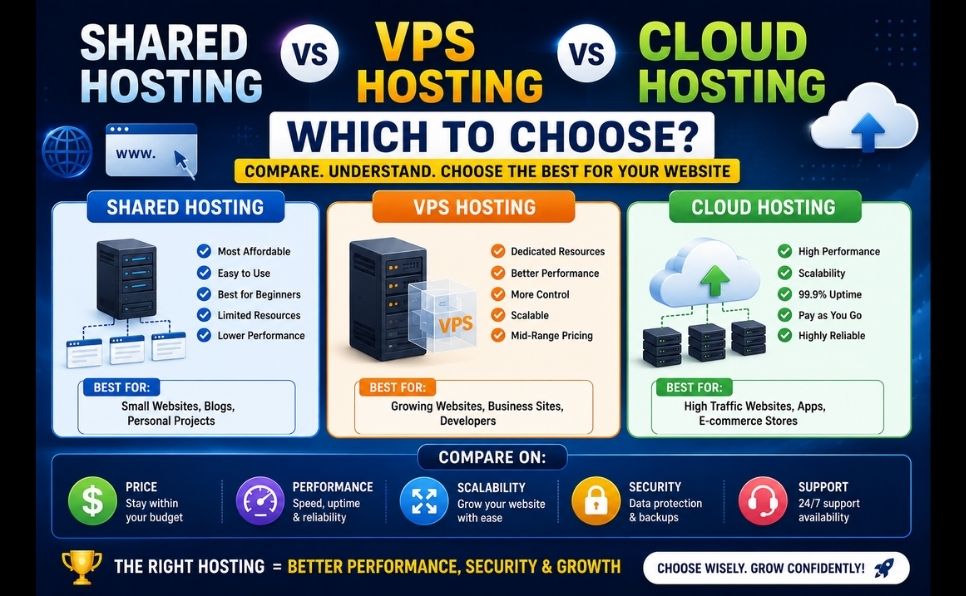
A VPS is technically a type of virtual machine — an isolated environment that shares physical hardware with other VPS instances but runs entirely independently, with its own OS and resources. AWS’s own explainer on VPS hosting is a useful technical reference if you want to go deeper. And if you’re also weighing cloud hosting as a third option, we’ve broken that down separately in shared hosting vs VPS vs cloud hosting.
| Factor | Shared Hosting | VPS Hosting |
|---|---|---|
| Resources | Shared with other sites on the server | Dedicated, isolated allocation |
| Performance | Can slow down if neighboring sites spike in traffic | Consistent, unaffected by other accounts |
| Control | Limited — provider manages everything | Full root/admin access, custom software allowed |
| Technical skill needed | Minimal — beginner friendly | Moderate to advanced, or a managed plan |
| Security | Shared risk environment | Isolated, but you’re responsible for hardening it (unless managed) |
| Scalability | Limited; often requires a plan upgrade | Scale CPU/RAM/storage independently |
| Cost | Lowest starting price | Higher, but scales with what you actually need |
Performance: Why VPS Usually Wins as You Grow
On shared hosting, a traffic spike on another site on your server can slow yours down — this is often called the “noisy neighbor” problem. A VPS eliminates that risk because your resources are walled off. This matters more than it sounds: page speed is a confirmed ranking factor, and Google explicitly evaluates loading performance as part of its Core Web Vitals assessment, which is one reason growing sites often migrate to VPS before it becomes a ranking problem.

Security: What Actually Changes
Shared hosting security is largely out of your hands — you’re protected (or exposed) based on how well the provider isolates accounts and patches the shared environment. On a VPS, isolation is built in at the virtualization layer, but the tradeoff is that you (or your managed hosting provider) are responsible for firewall rules, software updates, and server hardening. An unmanaged VPS with poor configuration can actually be less secure than good shared hosting — the control is only an advantage if you use it correctly.
Cost: The Real Comparison
Shared hosting plans typically start lower per month, which makes sense for a new site with unpredictable or low traffic. VPS plans cost more upfront, but the pricing scales with actual usage — you’re not sharing a resource pool with sites you have no control over. For a growing business, VPS often works out cheaper than repeatedly upgrading shared hosting tiers to chase performance you never fully get. If you’re comparing specific providers, our Hostinger vs Bluehost breakdown looks at real pricing across both shared and VPS tiers.
- You’re launching a new blog, portfolio, or small business site
- Your monthly traffic is modest and predictable
- You want zero server maintenance responsibility
- Budget is the primary constraint right now
- You don’t need custom server software or configurations
When to Choose VPS Hosting
- Your site is regularly experiencing slowdowns during traffic spikes
- You’re running an online store or web application with growing traffic
- You need custom software, specific PHP/Node versions, or server-level configuration
- You want performance that isn’t affected by other websites
- You’re planning for growth over the next 12–24 months, not just today
Managed vs Unmanaged VPS
If VPS sounds right but server administration doesn’t, most providers offer managed VPS plans — you get the dedicated resources and isolation of a VPS, while the provider still handles security patching, backups, and server maintenance. It costs more than unmanaged VPS but removes the technical burden that scares most beginners away from VPS in the first place. If you’re planning to resell hosting or manage client sites on your VPS, it’s also worth understanding what WHMCS is and how it handles billing and client management on top of your server.
Frequently Asked Questions
Is VPS better than shared hosting for SEO? VPS doesn’t directly boost rankings, but the performance consistency it provides supports faster load times — and page speed is a factor Google considers. If shared hosting is causing slowdowns during traffic spikes, that can indirectly hurt your SEO.
Can I switch from shared hosting to VPS later? Yes, and it’s actually the most common path — most sites start on shared hosting and migrate to VPS once traffic or performance needs grow. Most hosting providers offer migration assistance or one-click upgrades between their own plans.
Is VPS hosting hard to manage? Unmanaged VPS requires comfort with server administration — command line, security configuration, updates. Managed VPS removes almost all of that, functioning much like shared hosting but with dedicated resources.
How much traffic can shared hosting handle? It varies heavily by provider and plan, but shared hosting generally struggles once you’re consistently seeing several thousand visitors a day, especially with dynamic content like WooCommerce or membership sites.
Is VPS hosting worth it for a small business? If your traffic is stable and modest, shared hosting is usually enough. If you’re running eCommerce, expect growth, or have had performance complaints, VPS is typically worth the extra cost.
What’s the difference between VPS and a virtual machine? A VPS is a type of virtual machine — specifically one used to host websites or applications. Multiple virtual machines run on the same physical server, each isolated and operating independently, sharing the underlying hardware but not the runtime environment.