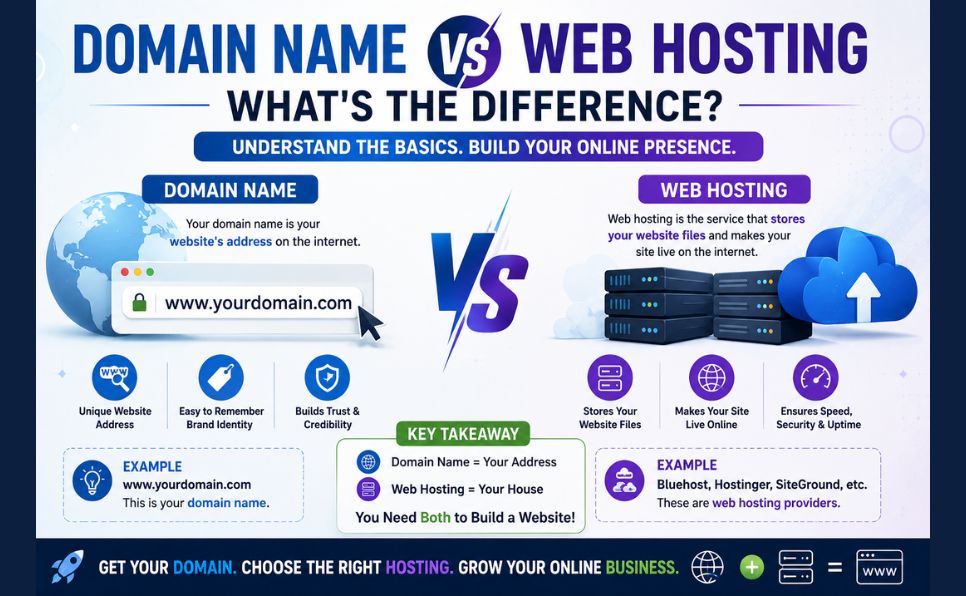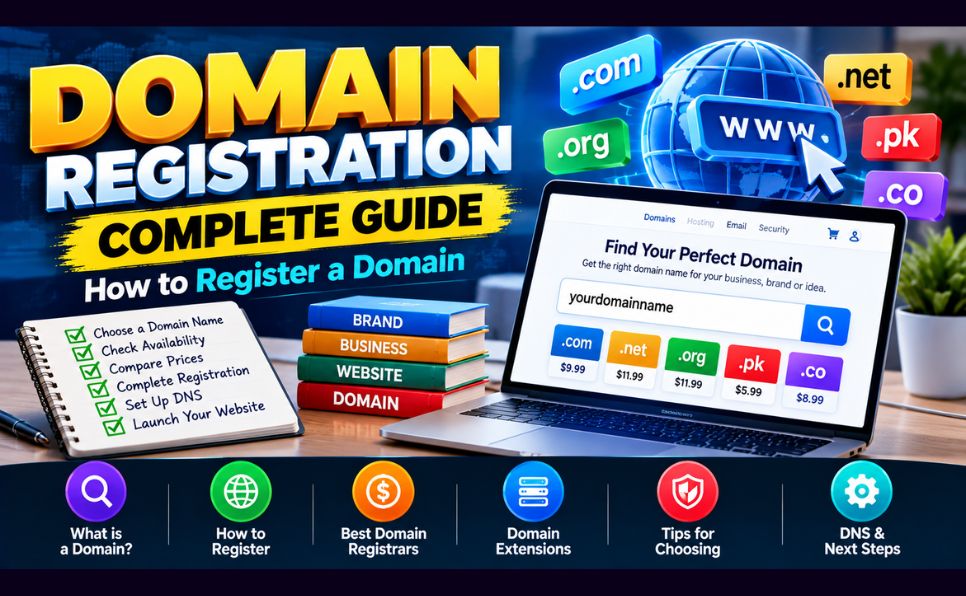
Your domain name is your identity on the internet. It’s the first thing people see, the address they type, and the brand they remember.
Getting it right — and registering it correctly — matters more than most beginners realize.
In this complete domain registration guide, you’ll learn:
- What domain registration actually is
- How to choose the perfect domain name
- Where to register a domain (best registrars in 2026)
- Step-by-step registration process
- How much a domain costs — and hidden fees to watch for
- Domain privacy, renewal, and transfer explained
- Common domain registration mistakes to avoid
Let’s get your domain registered correctly the first time. 👇
What Is Domain Registration?
Domain registration is the process of officially reserving a domain name (like antarvacna.org) through an accredited domain registrar for a set period — typically 1 year, renewable annually.
When you register a domain, you’re not buying it permanently — you’re leasing the exclusive right to use that name for as long as you keep renewing it.
Key Parties in Domain Registration:
| Party | Role | ||||
|---|---|---|---|---|---|
| ICANN | Internet Corporation for Assigned Names and Numbers — the global authority that oversees domain registration | ||||
| Registry | Organization that manages a specific TLD (e.g., Verisign manages .com) | ||||
| Registrar | Company accredited by ICANN to sell domains to the public (GoDaddy, Namecheap, etc.) | ||||
| Registrant | You — the person or business registering the domain |

Understanding Domain Extensions (TLDs)
A TLD (Top-Level Domain) is the extension at the end of your domain — .com, .org, .net, and hundreds more.
Most Popular TLDs in 2026:
| TLD | Best For | Approx. | ||||
|---|---|---|---|---|---|---|
| Annual Cost | ||||||
| .com | Businesses, general use — most trusted | $10–$15/year | ||||
| .org | Nonprofits, communities | $10–$15/year | ||||
| .net | Tech companies, networks | $10–$15/year | ||||
| .io | Tech startups, SaaS | $30–$60/year | ||||
| .ai | AI companies | $50–$100/year | ||||
| .co | Startups, businesses | $25–$35/year | ||||
| .info | Information sites | $5–$15/year | ||||
| Country TLDs (.pk, .uk, .de) | Local businesses | Varies | ||||
Which TLD Should You Choose?
Choose .com whenever possible. It remains the most trusted, most memorable, and most universally recognized TLD. When people hear a business name, they instinctively type .com.
If your preferred .com is taken, consider:
- Modifying the name (adding a word like “get”, “try”, “use”)
- Using a country TLD if your audience is local
- Using .io or .co for tech startups
- Using .org for nonprofits
Avoid obscure TLDs (.xyz, .info, .biz) for serious business use — they carry lower trust signals.
📖 Learn how to choose the perfect domain name: How to Choose a Domain Name (Without Regretting It Later)
Best Domain Registrars in 2026
Not all registrars are equal. Compare on price, renewal rates, privacy protection, and support.
1. Namecheap — Best Overall Value
Namecheap is consistently rated the best registrar for value — offering low prices, free WhoisGuard privacy protection, and excellent customer support.
| Feature | Detail |
|---|---|
| .com first year | ~$6–$9 |
| .com renewal | ~$13–$15/year |
| Privacy protection | Free (WhoisGuard) |
| Support | 24/7 live chat |
| Interface | Clean, beginner-friendly |
Best for: Most users — best balance of price, features, and support
2. Cloudflare Registrar — Best for Cost Transparency
Cloudflare Registrar sells domains at wholesale cost — no markup, no first-year discounts followed by high renewals.
| Feature | Detail |
|---|---|
| .com price | ~$8.57/year (wholesale) |
| Renewal price | Same as first year — no price jump |
| Privacy protection | Free |
| Support | Email/ticket |
| Extra features | Free Cloudflare CDN, DNS, security |
Best for: Users who want predictable, transparent pricing and already use Cloudflare
3. Google Domains (Squarespace Domains) — Best for Simplicity
Google Domains — now managed by Squarespace after Google’s 2023 acquisition — offers a clean, simple interface ideal for beginners.
| Feature | Detail |
|---|---|
| .com price | ~$12/year |
| Renewal price | Same — no price increase |
| Privacy protection | Free |
| Support | Email support |
| Interface | Very simple |
Best for: Beginners wanting a no-frills, reliable registrar
4. GoDaddy — Most Popular (With Caveats)
GoDaddy is the world’s largest registrar — but its pricing model deserves scrutiny. Introductory prices are very low; renewal prices are significantly higher.
| Feature | Detail |
|---|---|
| .com first year | ~$0.99–$2.99 (promotional) |
| .com renewal | ~$18–$22/year |
| Privacy protection | Paid add-on (~$10/year) |
| Support | 24/7 phone and chat |
| Interface | Feature-rich but complex |
Best for: Users who need phone support or want a single provider for domains + hosting
Warning: Always check the renewal price before registering with GoDaddy — the first-year discount can be 90%+ off, making renewals a shock.
5. Porkbun — Best for Bulk Buyers
Porkbun offers some of the lowest prices for bulk domain purchases and has a growing reputation for transparency and good support.
| Feature | Detail |
|---|---|
| .com first year | ~$7–$9 |
| .com renewal | ~$9–$11/year |
| Privacy protection | Free |
| Support | Email and chat |
| Interface | Simple, clean |
Best for: Developers and businesses registering multiple domains
Quick Registrar Comparison:
| Registrar | .com First Year | .com Renewal | Free Privacy | Best For |
|---|---|---|---|---|
| Namecheap | ~$7 | ~$14 | ✅ | Best overall |
| Cloudflare | ~$8.57 | ~$8.57 | ✅ | Transparent pricing |
| Google/Squarespace | ~$12 | ~$12 | ✅ | Simplicity |
| GoDaddy | ~$1–$3 | ~$20 | ❌ (paid) | Phone support |
| Porkbun | ~$8 | ~$10 | ✅ | Bulk buyers |
How to Register a Domain Name — Step by Step
Step 1: Choose Your Domain Name
Before registering, finalize your domain name. Key rules:
- Keep it short — under 15 characters ideally
- Make it easy to spell and remember
- Avoid hyphens and numbers
- Match your brand name
- Choose .com as your first choice
Step 2: Check Availability
Go to your chosen registrar and use the search tool:
namecheap.com → Type your desired domain → SearchIf your first choice is taken, the registrar will suggest alternatives. Don’t settle for a confusing alternative just because it’s available — take time to find a good name.
Step 3: Add to Cart
Once you find an available domain:
- Click “Add to Cart”
- Review the annual price (first year vs renewal)
- Select registration period (1–10 years)
Pro tip: Register for 2–3 years to lock in current pricing and signal to Google that your domain is established (long registration period is a minor trust signal).
Step 4: Configure Privacy Protection
WHOIS privacy (domain privacy) is essential. Without it, your personal details (name, address, email, phone number) are publicly visible in the WHOIS database to anyone who looks up your domain.
Most registrars now offer free privacy protection — enable it before checkout:
- Namecheap: Free WhoisGuard ✅
- Cloudflare: Free ✅
- Porkbun: Free ✅
- GoDaddy: Paid add-on (~$10/year) — add it anyway
Step 5: Avoid Unnecessary Add-ons
Registrars often bundle domains with add-ons you don’t need:
- ❌ Website builder (use WordPress instead)
- ❌ Professional email (use Google Workspace or Zoho)
- ❌ SSL certificate (get free Let’s Encrypt from your host)
- ❌ Domain backup (unnecessary with reputable registrars)
- ❌ “SEO tools” packages (generic, not worth the price)
The only add-on worth considering: domain privacy — and even that should be free with good registrars.
Step 6: Create Your Account and Pay
- Enter your email address and create a password
- Enter payment details (credit card, PayPal)
- Complete checkout
- Check your email for confirmation
Step 7: Access Your Domain Dashboard
After registration, log in to your registrar’s dashboard. Here you’ll manage:
- DNS records — pointing your domain to your hosting server
- Nameservers — connecting your domain to your web host
- Auto-renewal — keeping your domain from expiring
- Privacy settings — managing WHOIS privacy
Step 8: Connect Your Domain to Hosting
To point your domain to your web hosting account:
Method 1 — Change Nameservers (Most Common):
Registrar Dashboard → Domains → Manage DNS →
Change Nameservers to your host's nameservers
Example: ns1.hostinger.com, ns2.hostinger.com
Method 2 — Update A Record:
Registrar Dashboard → DNS Management →
A Record → Point to your server's IP address
DNS changes take 24–48 hours to fully propagate globally.
📖 Once your domain is connected, install WordPress: How to Install WordPress on cPanel: Step-by-Step Guide
Domain Registration Pricing — What You’ll Really Pay
Domain pricing is more complex than it appears. Here’s what to watch:
First Year vs Renewal Pricing
Many registrars offer dramatically discounted first-year pricing that returns to full price on renewal:
| Registrar | .com Year 1 | .com Year 2+ |
|---|---|---|
| GoDaddy | $0.99 | $21.99 |
| Namecheap | $7.98 | $13.98 |
| Cloudflare | $8.57 | $8.57 |
| Porkbun | $7.49 | $10.99 |
Always check the renewal price before registering. A $1 domain that renews at $22 costs $23 in year two — more than a $13 domain that renews at $13.
Premium Domains
Some short, high-value domain names are listed as “premium” and can cost hundreds to thousands of dollars for first-year registration. These are domains the registry has priced above standard rates due to demand.
If you see a domain listed at $500+ for a first year — that’s a premium domain. Avoid unless you specifically need that exact name.
Aftermarket Domains
Domains already registered by someone else can be purchased on aftermarket platforms:
- Sedo — large aftermarket marketplace
- Afternic — GoDaddy’s aftermarket platform
- Flippa — domains with established traffic
Aftermarket domains can range from $100 to millions. Only consider if the exact domain is critical to your brand.
Domain Privacy — Why It Matters
When you register a domain without privacy protection, your registration details are publicly accessible in the WHOIS database:
- Full name
- Home or business address
- Email address
- Phone number
This leads to:
- Spam emails — domain marketers scraping WHOIS data
- Spam calls — automated calls from domain sellers
- Privacy risks — personal information publicly visible
- Domain hijacking attempts — bad actors targeting exposed registrant data
Enable WHOIS privacy on every domain you register. It costs nothing with Namecheap, Cloudflare, and Porkbun.
Auto-Renewal — Never Lose Your Domain
Losing a domain because you forgot to renew is one of the most painful experiences in web ownership. Domains that lapse can be:
- Snapped up by domain squatters immediately
- Sold at inflated prices on aftermarket platforms
- Lost forever if squatters register them first
Essential auto-renewal practices:
- Enable auto-renewal immediately after registration
- Keep payment details up to date at your registrar
- Use an email address you check regularly for renewal notices
- Set a calendar reminder 60 days before expiry as backup
- Consider registering for 2–5 years to reduce renewal risk
📖 After registering your domain, connect it to your hosting: What Is Web Hosting? Complete Beginner’s Guide
Domain Transfer — Moving Between Registrars
If you want to move your domain to a different registrar:
Why Transfer a Domain:
- Better pricing at a new registrar
- Consolidating multiple domains in one account
- Better support or features
- Moving away from GoDaddy’s high renewal prices
How to Transfer a Domain:
Step 1: Unlock your domain at the current registrar:
Current Registrar → Domain Management →
Disable "Registrar Lock" or "Transfer Lock"
Step 2: Get the EPP/Authorization code:
Current Registrar → Domain → Get Transfer Code
(Also called Auth Code or EPP Code)
Step 3: Initiate transfer at the new registrar:
New Registrar → Domains → Transfer Domain →
Enter domain name + Auth Code
Step 4: Confirm via email and wait 5–7 days for transfer completion
Important: Domain transfers extend your registration by 1 year — effectively giving you a free year. Transfers are free at most registrars.
Transfer restrictions:
- Domains must be at least 60 days old
- Domain must be unlocked
- Domain must not have expired
Common Domain Registration Mistakes
❌ Mistake 1: Registering with Your Hosting Company
Many hosting companies offer “free” domain registration with hosting plans. The catch: when you leave that host, transferring your domain can be complicated. Keep your domain registration and hosting separate — it gives you more flexibility.
❌ Mistake 2: Not Enabling Auto-Renewal
The single most common cause of accidentally losing a domain. Enable auto-renewal immediately after registration — no exceptions.
❌ Mistake 3: Skipping Privacy Protection
Leaving WHOIS data public invites spam and privacy risks. Enable free privacy protection at every registrar that offers it.
❌ Mistake 4: Choosing Based Only on First-Year Price
A $0.99 domain that renews at $22 is not a bargain. Always calculate the 3-year total cost before registering.
❌ Mistake 5: Buying Unnecessary Add-ons
Website builders, email services, SSL certificates, and “SEO tools” sold by registrars are almost always overpriced and inferior to dedicated alternatives.
❌ Mistake 6: Registering a Trademark
Registering a domain containing another company’s trademark — even with different TLDs — can result in legal action and forced domain transfer. Search the USPTO trademark database before registering names similar to established brands.
❌ Mistake 7: Using Personal Email for Registration
Use a dedicated business email for domain registration. If your personal email is compromised or you change providers, you could lose access to domain management. A permanent business email (admin@yourdomain.com) is ideal — once you have hosting set up.
Domain Registration Checklist
Before Registering:
- Domain name decided (short, memorable, brandable)
- .com availability checked — or alternative TLD chosen
- Registrar chosen based on renewal price, not first-year price
- Trademark search completed
During Registration:
- Privacy/WHOIS protection enabled
- Unnecessary add-ons declined
- Registration period set (2–3 years recommended)
- Correct email address used for account
After Registration:
- Auto-renewal enabled
- Payment details confirmed current
- Nameservers or DNS updated to point to hosting
- Calendar reminder set 60 days before expiry
- Login credentials saved securely
Conclusion — Register Your Domain the Right Way
Domain registration is a straightforward process — but the decisions you make (registrar, TLD, privacy, renewal terms) have long-term consequences.
Your 5-step action plan:
- Choose a short, memorable .com domain name
- Register with Namecheap or Cloudflare for the best value and free privacy
- Enable auto-renewal immediately
- Skip the add-ons — you don’t need them
- Point your domain to your hosting using nameservers
Your domain name is your permanent address on the internet. Take 30 minutes to get it right — you’ll be glad you did.
Frequently Asked Questions (FAQ)
How much does it cost to register a domain name?
A .com domain typically costs $8–$15/year from reputable registrars. First-year promotional prices can be as low as $1 at some registrars, but renewal prices may be $18–$22/year. Cloudflare Registrar offers transparent pricing at ~$8.57/year for .com with no first-year discount gimmick.
How long does domain registration take?
Domain registration is instant — within minutes of completing your purchase, your domain is registered and visible in your account dashboard. DNS propagation (connecting your domain to hosting) takes 24–48 hours to complete globally.
Can I register a domain without hosting?
Yes — domain registration and web hosting are separate services. You can register a domain today and add hosting later. Many registrars allow you to “park” a domain with a placeholder page until you’re ready to build your website.
What happens if I forget to renew my domain?
Most registrars provide a grace period (typically 30 days) after expiry where you can renew at the standard price. After that, a redemption period (up to 30 days more) applies — at significantly higher cost ($80–$200). After redemption, the domain is released and can be registered by anyone. Enable auto-renewal to avoid this scenario entirely.
Can I transfer my domain to a different registrar?
Yes — domain transfers are straightforward and usually free at the receiving registrar. The process takes 5–7 days. You’ll need your current domain’s authorization code (EPP code). Transferred domains receive a 1-year extension to their registration period.
Is domain privacy protection necessary?
Yes — for almost every domain owner. Without privacy protection, your personal details (name, address, email, phone) are publicly visible in the WHOIS database. This leads to spam, unwanted calls, and privacy risks. Most reputable registrars (Namecheap, Cloudflare, Porkbun) offer WHOIS privacy free — always enable it.
Found this guide helpful? Share it with someone registering their first domain. Questions? Drop them in the comments — we answer every one!