Choosing the wrong website platform can cost you months of wasted effort — and potentially thousands of dollars to migrate later.
In 2026, three platforms dominate the website creation landscape: WordPress, Wix, and Shopify. Each has millions of passionate users. Each has real advantages. And each is genuinely wrong for certain types of projects.
Here are the latest numbers that frame this comparison:
- WordPress powers 42.5% of all websites in 2026 — the most-used CMS on the internet with 59.9% of the known CMS market
- Shopify holds 26.2% market share by store count but leads in gross merchandise volume with $378.44 billion+ GMV in 2025
- Wix holds 6.1% of the known CMS market and continues to grow among beginners and small businesses
In this complete comparison, you’ll learn:
- What each platform actually is and how it works
- Detailed feature, pricing, and performance comparison
- Which platform wins for specific use cases
- Real pros and cons of each
- Our honest recommendation for 2026
Let’s find the right platform for you. 👇
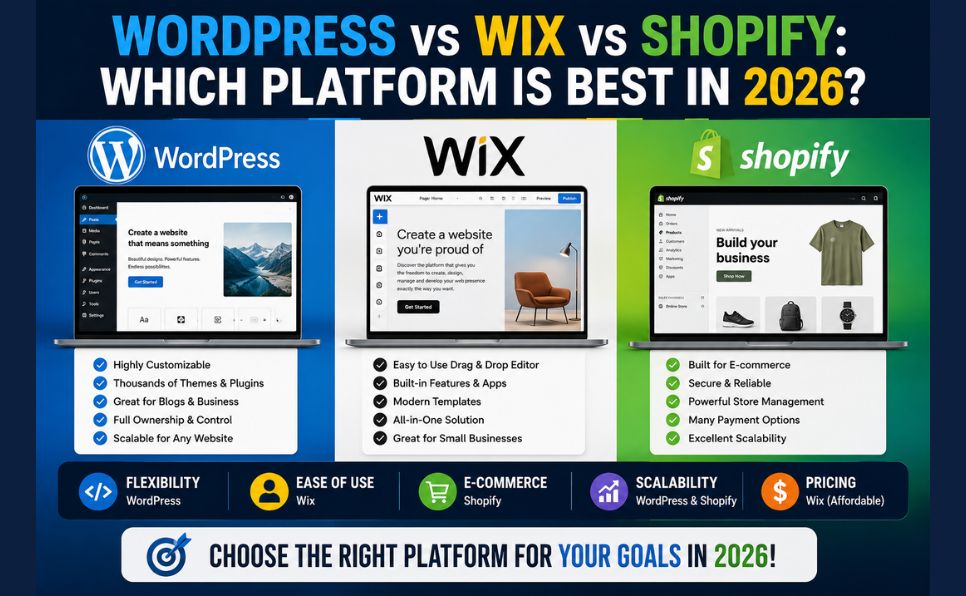
Quick Answer: WordPress vs Wix vs Shopify
| Feature | WordPress | Wix | Shopify |
|---|---|---|---|
| Type | Self-hosted CMS | Hosted website builder | Hosted eCommerce platform |
| Best for | Blogs, business sites, advanced users | Beginners, small businesses | Online stores |
| Starting price | ~$3–10/month (hosting only) | $17/month | $29/month |
| Ease of use | Moderate learning curve | Very easy | Easy |
| Customization | Unlimited | Limited | Moderate |
| eCommerce | Via WooCommerce plugin | Basic built-in | Industry-leading |
| SEO capability | Excellent | Good | Good |
| Ownership | You own everything | Platform controls | Platform controls |
| Market share | 59.9% of CMS market | 6.1% of CMS market | 7.2% of CMS market |
| Scalability | Unlimited | Limited | Very good |
What Is WordPress?
WordPress is a free, open-source content management system (CMS) that you download and install on your own web hosting server. It was originally launched in 2003 as a blogging platform and has since evolved into the world’s most powerful and flexible website platform.
As of 2026, more than 522 million sites use WordPress, and WordPress 6.9 has been downloaded more than 34 million times.

Two Versions of WordPress — Important Distinction:
| WordPress.org | WordPress.com | |
|---|---|---|
| Type | Self-hosted (you install it) | Hosted service |
| Cost | Free software — pay for hosting | Free to paid plans |
| Control | Complete control | Limited |
| Plugins | 70,000+ available | Restricted on free plans |
| Monetization | Fully flexible | Restricted on lower plans |
| Best for | Serious websites | Casual personal blogs |
This comparison covers WordPress.org — the self-hosted version used by serious bloggers, businesses, and developers worldwide.
WordPress Key Features:
- 64,000+ free plugins in the official WordPress.org directory and over 70,000 total including premium options
- Thousands of free and premium themes
- Complete ownership of your data and content
- Works for any type of website — blog, business, eCommerce, portfolio, membership site
- Supported by the largest web development community in the world
- WooCommerce powers 4.25 million active online stores and holds 33.4% of the global eCommerce platform market by store count
📖 New to web hosting? Learn where to host your WordPress site: What Is Web Hosting? Complete Beginner’s Guide
What Is Wix?
Wix is a cloud-based website builder that hosts your website on its own servers. You design your site using a drag-and-drop visual editor — no coding or technical knowledge required.
Founded in 2006 and headquartered in Tel Aviv, Wix has grown to serve over 250 million users worldwide. It’s particularly popular among small businesses, freelancers, and individuals who want an attractive website quickly without technical complexity.
Wix Key Features:
- True drag-and-drop editor — place any element anywhere on the page
- 900+ professionally designed templates
- Built-in hosting — no separate hosting account needed
- Wix ADI (Artificial Design Intelligence) — AI creates a website automatically based on your answers
- Built-in SEO tools, analytics, and marketing features
- App Market with hundreds of integrations
- Wix eCommerce for online stores (limited compared to Shopify)
Wix Limitations:
- Once you choose a template, you cannot switch without rebuilding your site
- Cannot export your content to another platform easily
- Performance can be slower than self-hosted alternatives
- Limited customization compared to WordPress
What Is Shopify?
Shopify is a dedicated eCommerce platform — purpose-built for selling products online. It handles everything from product listings and inventory to payment processing and shipping.
Shopify holds 26.2% market share by store count but leads significantly in gross merchandise volume with $378.44 billion+ GMV in 2025.
Shopify Key Features:
- Purpose-built for eCommerce — every feature optimized for selling
- Built-in payment processing (Shopify Payments)
- Comprehensive inventory and order management
- Multi-channel selling — sell on Instagram, Facebook, Amazon, and in-person
- Abandoned cart recovery built-in
- Extensive app store (8,000+ apps)
- 24/7 customer support
- Fast, reliable hosting included
Shopify Limitations:
- Transaction fees if not using Shopify Payments (0.5%–2% per transaction)
- Monthly fees are higher than WordPress hosting
- Limited content/blogging capabilities compared to WordPress
- You don’t own your platform — Shopify controls the rules
Detailed Feature Comparison
1. Ease of Use
| Platform | Learning Curve | Who It’s For |
|---|---|---|
| WordPress | Moderate — takes time to learn | Users willing to invest time for maximum control |
| Wix | Very low — drag and drop | Complete beginners wanting speed |
| Shopify | Low — guided setup | Business owners focused on selling |
WordPress requires understanding hosting, themes, plugins, and some technical concepts. It’s not hard — but it has a learning curve compared to the others.
Wix is genuinely the easiest of the three. The drag-and-drop editor is intuitive, templates are beautiful, and Wix ADI can build a complete site automatically in minutes.
Shopify is easy for eCommerce specifically. The setup wizard guides you through adding products, setting up payments, and configuring shipping step by step.
Winner for ease of use: Wix ✅
2. Pricing Comparison
WordPress Pricing:
WordPress software is free. Your costs are:
| Cost Item | Typical Price |
|---|---|
| Web hosting | $2–$10/month (shared hosting) |
| Domain name | $10–$15/year |
| Premium theme | $30–$100 (one-time, optional) |
| Premium plugins | $0–$200/year (optional) |
| Total minimum | ~$3–4/month |
📖 Compare hosting options for your WordPress site: Shared Hosting vs VPS vs Cloud Hosting
Wix Pricing (2026):
| Plan | Price/Month | Best For |
|---|---|---|
| Light | $17 | Personal websites |
| Core | $29 | Basic business site |
| Business | $36 | Growing businesses |
| Business Elite | $159 | Large businesses |
Note: Free plan available but shows Wix ads and uses Wix subdomain
Shopify Pricing (2026):
| Plan | Price/Month | Best For |
|---|---|---|
| Basic | $29 | New online stores |
| Shopify | $79 | Growing stores |
| Advanced | $299 | Scaling businesses |
| Plus | $2,300 | Enterprise |
Note: Transaction fees apply if not using Shopify Payments
Winner for pricing: WordPress ✅ (significantly lower cost for equivalent functionality)
3. Design and Customization
| Platform | Design Flexibility | Template Quality |
|---|---|---|
| WordPress | Unlimited — change anything | Thousands of themes |
| Wix | Good within templates | 900+ modern templates |
| Shopify | Moderate | 100+ eCommerce-focused themes |
WordPress offers unlimited design flexibility. With page builders like Elementor or the native Gutenberg editor, you can create virtually any design. Thousands of free and premium themes are available.
Wix has beautiful, modern templates and a true drag-and-drop editor. However, once you pick a template, switching requires rebuilding — a significant limitation.
Shopify has quality themes optimized for eCommerce, but design customization is more limited than WordPress.
Winner for customization: WordPress ✅
4. SEO Capabilities
SEO is critical for driving organic traffic to your website.
| Platform | SEO Capability | Key Tools |
|---|---|---|
| WordPress | Excellent | RankMath, Yoast SEO — full control |
| Wix | Good | Built-in SEO tools, improving |
| Shopify | Good | Built-in SEO, some limitations |
WordPress offers the most complete SEO control of the three platforms. With plugins like RankMath or Yoast SEO, you have full control over meta titles, descriptions, schema markup, sitemaps, canonical tags, and more.
Wix has significantly improved its SEO capabilities in recent years. It now offers customizable meta tags, auto-generated sitemaps, structured data, and the Wix SEO Wiz tool. Still not as flexible as WordPress.
Shopify has solid built-in SEO for eCommerce — product schema, clean URL structures, and fast loading times. However, URL structure customization is limited.
📖 Maximize SEO on any platform: On-Page SEO Complete Guide 2026
Winner for SEO: WordPress ✅
5. eCommerce Capabilities
| Platform | eCommerce Strength | Best For |
|---|---|---|
| WordPress + WooCommerce | Very strong — highly customizable | Stores needing flexibility |
| Wix eCommerce | Basic to moderate | Small stores, simple products |
| Shopify | Industry-leading | Serious online retailers |
WordPress with WooCommerce is an extremely powerful eCommerce solution — WooCommerce powers 4.25 million active online stores and holds 33.4% of the global eCommerce platform market by store count. It supports physical and digital products, subscriptions, memberships, and virtually any eCommerce model. However, it requires more technical management.
Wix eCommerce handles small online stores well — simple product listings, basic inventory, and standard payment processing. Not suitable for large catalogs or complex eCommerce operations.
Shopify is the undisputed eCommerce leader for dedicated online stores. Shopify leads significantly in gross merchandise volume among dedicated eCommerce platforms. Multi-channel selling, abandoned cart recovery, and professional inventory management are all built-in.
Winner for eCommerce: Shopify ✅ (for dedicated stores) / WordPress+WooCommerce ✅ (for flexibility)
6. Performance and Speed
The average WordPress page loads in 3.4 seconds — well above the 2.5-second threshold Google recommends for Core Web Vitals. Modern alternatives like Next.js (0.8s average) and Webflow (1.4s) are pulling ahead on performance metrics.
| Platform | Average Load Time | Performance Control |
|---|---|---|
| WordPress | 3.4 seconds (unoptimized) | Full control with caching plugins |
| Wix | 2.1–2.8 seconds | Limited — platform managed |
| Shopify | 1.8–2.4 seconds | Good — Shopify’s CDN |
WordPress can be extremely fast when optimized — but requires effort. Caching plugins (WP Rocket), image compression, and a good CDN (Cloudflare) can bring WordPress pages to under 1 second. Without optimization, it’s often the slowest of the three.
Wix has improved significantly and manages performance for you — though you have less control over optimization.
Shopify uses a global CDN and optimized infrastructure that keeps store pages fast by default.
📖 Speed up your WordPress site: Page Speed Optimization: Complete Guide
Winner for performance (out of the box): Shopify ✅ Winner for performance (optimized): WordPress ✅
7. Security
| Platform | Security Management | Key Concerns |
|---|---|---|
| WordPress | You manage security | Patchstack documented 11,334 new WordPress vulnerabilities in 2025 — 91% from plugins |
| Wix | Platform managed | Wix handles all security |
| Shopify | Platform managed | Shopify handles all security |
WordPress requires active security management. Wordfence blocked 55 billion password attack attempts in 2024 alone. Installing security plugins (Wordfence, Sucuri), keeping plugins updated, and using strong passwords are essential. The security burden is real — but manageable.
Wix and Shopify handle security at the platform level — SSL, DDoS protection, and security patches are automatic. Less control, but less responsibility.
Winner for security ease: Wix / Shopify ✅ (tied) Winner for security control: WordPress ✅
8. Ownership and Data Portability
This is one of the most important — and most overlooked — factors in choosing a platform.
| Platform | Who Owns Your Site | Data Portability |
|---|---|---|
| WordPress | You own everything | Export all data anytime |
| Wix | Wix owns the platform | Very limited export options |
| Shopify | Shopify owns the platform | Export product/customer data only |
WordPress gives you complete ownership. Your content, your data, your files — all on your own hosting server. If you want to move hosts or platforms, everything comes with you.
Wix is significantly more restrictive. You cannot export your Wix website design or content to another platform. If Wix changes its terms or pricing, you’re largely locked in.
Shopify allows exporting product and customer data but not your entire store structure. Migrating away from Shopify is possible but complex.
Winner for ownership: WordPress ✅ (clear winner)
9. Scalability
| Platform | Scalability | Limit |
|---|---|---|
| WordPress | Unlimited | Scale with your hosting |
| Wix | Moderate | Platform limitations apply |
| Shopify | Very good | Enterprise plans available |
WordPress is used by some of the world’s largest websites — news networks, major corporations, high-traffic blogs. With the right hosting infrastructure, WordPress scales infinitely.
Wix is suitable for small to medium businesses but has limitations for very high-traffic sites.
Shopify scales very well for eCommerce — from a one-product store to enterprise multi-million dollar operations.
Winner for scalability: WordPress ✅ (for general sites) / Shopify ✅ (for eCommerce)
Which Platform Should You Choose?
Choose WordPress If You:
- ✅ Want complete control and ownership of your website
- ✅ Are building a blog, news site, or content-heavy website
- ✅ Need advanced SEO capabilities
- ✅ Want to minimize long-term costs
- ✅ Plan to build a complex or unique website
- ✅ Are building an eCommerce store with complex product requirements (use WooCommerce)
- ✅ Have some technical willingness to learn
- ✅ Want to scale without platform restrictions
Best WordPress use cases: Blogs, news sites, business websites, portfolios, membership sites, complex eCommerce, educational platforms
Choose Wix If You:
- ✅ Are a complete beginner with no technical background
- ✅ Need a beautiful website up quickly — within hours
- ✅ Run a local small business, restaurant, or service business
- ✅ Have a limited budget but want professional design
- ✅ Don’t plan to sell more than a small number of products
- ✅ Prefer an all-in-one solution with no technical maintenance
Best Wix use cases: Local businesses, photographers, freelancers, personal portfolios, small service businesses
Choose Shopify If You:
- ✅ Are building a dedicated online store
- ✅ Plan to sell products as your primary business
- ✅ Want industry-leading eCommerce tools out of the box
- ✅ Need multi-channel selling (social media, marketplaces, in-person)
- ✅ Want professional inventory management without technical setup
- ✅ Are willing to pay more for eCommerce-specific features
Best Shopify use cases: Online retail stores, dropshipping businesses, product brands, multi-channel eCommerce
Platform Comparison by Website Type
| Website Type | Best Platform | Why |
|---|---|---|
| Personal blog | WordPress | Best content management, SEO, free |
| Business website | WordPress | Flexibility, ownership, cost |
| Portfolio | Wix | Beautiful templates, easy setup |
| Restaurant/local biz | Wix | Quick setup, booking features |
| Online store (small) | Shopify or Wix | Easier setup than WooCommerce |
| Online store (large) | Shopify | Best eCommerce tools at scale |
| Complex eCommerce | WordPress + WooCommerce | Maximum flexibility |
| News/magazine site | WordPress | Content management + scale |
| Membership site | WordPress | Plugin ecosystem supports it |
| Nonprofit | WordPress | Free software, full control |
WordPress vs Wix vs Shopify: 2026 Market Reality
WordPress remains the world’s leading content management system in 2026. It still powers a large share of the web and stays far ahead of its closest competitors. At the same time, the market is becoming more competitive. Platforms like Shopify and Wix continue to grow, while WordPress’s share has declined slightly. Even so, WordPress remains highly relevant. It’s customizable, open-source, and self-hosted, while its broad compatibility with themes and plugins supports many website types.
WordPress turned 23 in 2026 and still powers nearly half the web. That single statistic obscures a more complex reality: the platform is simultaneously growing its market share and losing ground on performance, security, and developer experience to modern alternatives.
The honest truth in 2026:
- WordPress remains the best choice for most websites — blogs, businesses, and flexible eCommerce
- Wix has closed the gap significantly for beginners and small businesses
- Shopify is unmatched for dedicated eCommerce operations
- AI-powered website builders are emerging but not yet competitive for serious websites
Complete Decision Checklist
Choose WordPress if:
- You want to own your platform completely
- SEO is a primary priority
- Long-term cost matters
- You’re building a content-heavy site
- You want unlimited customization
- You’re building complex eCommerce (WooCommerce)
Choose Wix if:
- You’re a complete beginner
- You need a website live today
- You’re building a portfolio or local business site
- You don’t want to deal with hosting or technical maintenance
- Design aesthetics are your top priority
Choose Shopify if:
- Your primary goal is selling products online
- You need professional inventory management
- You want multi-channel selling
- eCommerce features matter more than blogging/content
Conclusion — The Right Platform Depends on Your Goal
There is no universally “best” platform among WordPress, Wix, and Shopify — only the best platform for your specific goals.
Our 2026 recommendations:
- For most websites: WordPress — the flexibility, ownership, and cost advantages are unmatched
- For beginners needing speed: Wix — the easiest path to a professional-looking website
- For online stores: Shopify — the industry standard for serious eCommerce
If you’re unsure, start by answering this one question: Is your primary goal to sell products?
- Yes → Consider Shopify
- No → Consider WordPress (if you want full control) or Wix (if you want simplicity)
Whatever you choose — start today. The best website platform is the one you actually build on.
Frequently Asked Questions (FAQ)
Is WordPress better than Wix in 2026?
For most serious websites — yes. WordPress offers more flexibility, better SEO capabilities, complete data ownership, and significantly lower long-term costs. However, Wix is genuinely better for complete beginners who need a simple website quickly without any technical learning curve.
Can I switch from Wix to WordPress later?
Technically yes, but it’s not easy. Wix doesn’t allow exporting your site design or most content directly. You would need to rebuild your site on WordPress, manually recreating your pages and migrating your content. This is one reason to choose carefully from the start.
Is Shopify or WooCommerce better for eCommerce?
Shopify is easier to set up and maintain. WooCommerce (WordPress) is more flexible and customizable, with no transaction fees and lower ongoing costs for most stores. Small to medium stores often prefer Shopify’s simplicity. Stores with complex product requirements, memberships, or unique configurations often prefer WooCommerce.
Which platform is cheapest in 2026?
WordPress is significantly cheaper long-term. Basic hosting starts at $2–4/month versus $17+/month for Wix and $29+/month for Shopify. For a simple blog or business website, WordPress costs 4–8x less than comparable Wix or Shopify plans annually.
Does WordPress still dominate in 2026?
Yes — though its market share has slightly declined. WordPress still powers approximately 42.5% of all websites and holds nearly 60% of the known CMS market. No other platform comes close in overall adoption. The slight decline reflects the rise of AI website builders and SaaS platforms rather than a fundamental shift away from WordPress.
Which platform is best for SEO?
WordPress consistently ranks highest for SEO capability among the three platforms. With plugins like RankMath or Yoast SEO, you have complete control over every SEO element. Both Wix and Shopify have improved their SEO tools significantly but still don’t match WordPress’s flexibility and depth of SEO control.
Found this comparison helpful? Share it with someone choosing their first website platform. Have a question about WordPress, Wix, or Shopify? Drop it in the comments — we answer every one!