You’ve decided to build a website — but now you’re stuck on a confusing decision: shared hosting, VPS, or cloud hosting?
Each option has different pricing, performance, and technical requirements. Choose wrong, and you’ll either overpay for resources you don’t need, or underpay and watch your site crash during a traffic spike.
In this complete comparison, you’ll learn:
- What each hosting type actually means
- Side-by-side comparison of performance, price, and scalability
- Which type fits your specific website needs
- When to upgrade from one type to another
- Real-world scenarios for each option
Let’s settle this once and for all. 👇
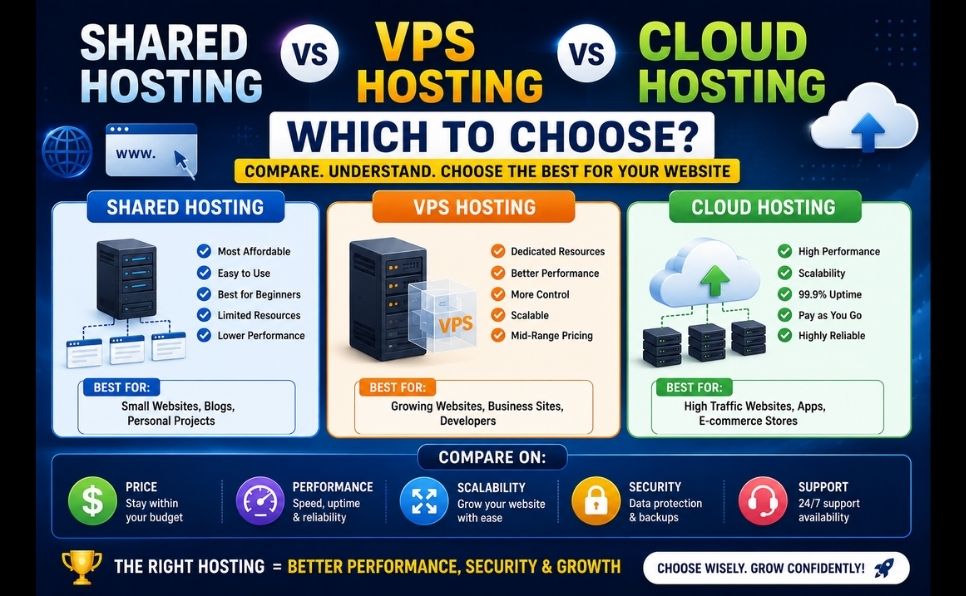
| Feature | Shared Hosting | VPS Hosting | Cloud Hosting |
|---|---|---|---|
| Price | $2–$10/month | $10–$80/month | Pay-as-you-go |
| Resources | Shared with many sites | Dedicated, guaranteed | Flexible, scalable |
| Performance | Basic | Good | Excellent |
| Scalability | Very limited | Moderate | Excellent |
| Technical skill needed | None | Medium | Medium-High |
| Uptime reliability | Good | Very good | Excellent |
| Best for | Beginners, small blogs | Growing websites | High-traffic, variable load sites |
| Setup difficulty | Easiest | Moderate | Moderate to complex |
Shared hosting means your website lives on a server alongside hundreds — sometimes thousands — of other websites, all sharing the same CPU, RAM, and bandwidth resources.
📖 If you’re completely new to hosting concepts, start here: What Is Web Hosting? Complete Beginner’s Guide
Imagine a large apartment building. Everyone shares the same water supply, electricity grid, and building infrastructure. If one tenant uses excessive electricity, everyone else might experience reduced power — same with shared hosting, where one busy website can slow down others on the same server.
- Cheapest hosting option available
- No technical knowledge required
- Quick and easy setup (often automated)
- Includes cPanel or similar management dashboard
- Great for testing ideas with minimal investment
- Performance affected by other websites on the server (“noisy neighbor” effect)
- Limited resources — struggles with traffic spikes
- Less control over server configuration
- Security risks if other sites on the server are compromised
- Not suitable for resource-intensive applications
- Brand new bloggers and website owners
- Small business websites with low-to-moderate traffic
- Personal portfolios
- Anyone testing a website idea before investing more
What Is VPS Hosting?
VPS (Virtual Private Server) hosting divides one physical server into multiple isolated virtual servers — each with its own dedicated resources, even though they share the same physical hardware.
How VPS Hosting Works:
Using virtualization technology, the physical server is split into separate virtual compartments. Each compartment gets a guaranteed amount of CPU, RAM, and storage — completely isolated from other users on the same physical machine.
Think of it like a townhouse complex: you share the building structure with neighbors, but you have your own private space, your own utilities, and your own locked door. Your neighbor’s water usage doesn’t affect your water pressure.
VPS Hosting Pros:
- Dedicated, guaranteed resources (no noisy neighbor problem)
- Significantly better performance than shared hosting
- Root access for full server customization
- Better security isolation from other users
- Scalable — easy to upgrade resources as needed
VPS Hosting Cons:
- Requires more technical knowledge to manage (unless using managed VPS)
- More expensive than shared hosting
- You’re responsible for server maintenance (unmanaged plans)
- Setup can be more complex for beginners
Managed vs Unmanaged VPS:
| Managed VPS | Unmanaged VPS | |
|---|---|---|
| Server maintenance | Host handles it | You handle it |
| Technical skill needed | Low | High |
| Price | Higher | Lower |
| Best for | Beginners wanting VPS power | Experienced developers |
Who Should Choose VPS Hosting:
- Growing websites that have outgrown shared hosting
- Online stores with moderate-to-high traffic
- Websites needing custom server configurations
- Developers who want more control without enterprise pricing
- Businesses needing better security isolation
What Is Cloud Hosting?
Cloud hosting distributes your website across a network of multiple interconnected servers rather than relying on a single server. If one server experiences issues, others automatically take over — ensuring near-perfect uptime.
📖 Understand the broader cloud computing technology behind this: What Is Cloud Computing and How Does It Work?
How Cloud Hosting Works:
Instead of one physical machine handling everything, your website’s resources (processing, storage, bandwidth) are pulled from a vast network of servers — often spread across multiple data centers globally. Resources scale automatically based on real-time demand.
Cloud Hosting Pros:
- Excellent uptime — multiple servers provide redundancy
- Highly scalable — resources adjust automatically to traffic spikes
- Pay only for resources you actually use
- Better global performance (servers in multiple locations)
- Resilient against hardware failures
Cloud Hosting Cons:
- Pricing can be unpredictable if traffic spikes unexpectedly
- More complex setup and management
- Requires understanding of cloud-specific tools and dashboards
- Can become expensive at scale without proper optimization
Who Should Choose Cloud Hosting:
- Websites with unpredictable or rapidly growing traffic
- eCommerce stores during high-traffic sales events
- Media sites that may go viral unexpectedly
- Businesses requiring maximum uptime and reliability
- Applications serving a global audience
Side-by-Side Performance Comparison
Speed Comparison
| Hosting Type | Average Page Load Time | Server Response Time (TTFB) |
|---|---|---|
| Shared Hosting | 1.5–3.5 seconds | 200–600ms |
| VPS Hosting | 0.8–2 seconds | 100–300ms |
| Cloud Hosting | 0.5–1.5 seconds | 50–200ms |
📖 Page speed directly affects your SEO rankings — learn how to optimize it regardless of hosting type: Page Speed Optimization: Complete Guide
Uptime Comparison
| Hosting Type | Typical Uptime Guarantee | Real-World Reliability |
|---|---|---|
| Shared Hosting | 99.9% | Good for normal traffic |
| VPS Hosting | 99.9%–99.95% | Very good, isolated resources |
| Cloud Hosting | 99.99%+ | Excellent, redundant infrastructure |
Traffic Handling Comparison
| Monthly Visitors | Recommended Hosting |
|---|---|
| 0–10,000 | Shared Hosting |
| 10,000–50,000 | VPS Hosting |
| 50,000–200,000 | VPS or Cloud Hosting |
| 200,000+ | Cloud Hosting |
| Unpredictable/viral potential | Cloud Hosting |
Price Comparison: Real Numbers
| Hosting Type | Entry Price | Mid-Tier | High-End |
|---|---|---|---|
| Shared Hosting | $2–$4/month | $5–$10/month | $10–$15/month |
| VPS Hosting | $10–$20/month | $20–$50/month | $50–$150/month |
| Cloud Hosting | $5–$15/month (small) | $20–$100/month | $100–$1,000+/month |
Important note on cloud pricing: Cloud hosting often uses pay-as-you-go pricing, meaning your costs can fluctuate based on actual resource usage — unlike the fixed pricing of shared and VPS hosting.
Scalability Comparison
This is where the real difference between these hosting types becomes clear.
- Upgrading typically means moving to a higher shared plan or switching hosting types entirely
- Cannot handle sudden traffic spikes well
- Migration to VPS/Cloud often required as you grow
VPS Hosting Scalability: ⭐⭐⭐⭐ (Good)
- Can usually upgrade CPU/RAM with a few clicks
- Some downtime may be required during resource upgrades
- Still has upper limits based on the physical server
Cloud Hosting Scalability: ⭐⭐⭐⭐⭐ (Excellent)
- Resources can scale automatically in real-time
- Handles sudden traffic spikes (like a viral post) without crashing
- No practical upper limit — can scale to enterprise levels
Real-World Scenarios: Which Should YOU Choose?
Scenario 1: “I’m starting my first blog”
Choose: Shared Hosting You don’t yet know your traffic patterns, and shared hosting gives you an affordable way to test your idea without overcommitting financially.
Scenario 2: “My blog gets 30,000 visitors/month and feels slow”
Choose: VPS Hosting You’ve outgrown shared hosting’s limited resources. VPS gives you dedicated power at a reasonable price point.
Scenario 3: “I run an online store with seasonal sales spikes”
Choose: Cloud Hosting Black Friday or holiday sales can cause sudden 10x traffic increases. Cloud hosting scales automatically to handle this without crashing.
Scenario 4: “I manage multiple client websites”
Choose: VPS Hosting (or Reseller Hosting) VPS gives you the control and resources to manage multiple sites efficiently, with better isolation than shared hosting.
📖 If you’re managing multiple client sites and need billing automation, learn about: What Is WHMCS? Complete Beginner’s Guide for Web Hosting
Choose: Cloud Hosting Unpredictable traffic spikes are exactly what cloud hosting is designed to handle without your site crashing at the worst possible moment.
Scenario 6: “I need maximum security for sensitive data”
Choose: VPS or Dedicated Hosting The isolation VPS provides reduces the risk of other websites on the same server compromising your security.
How to Know When to Upgrade
- Your website regularly experiences slowdowns during normal traffic
- You’re hitting resource limits set by your hosting provider
- You need custom server software or configurations
- Your site handles sensitive data requiring better isolation
- You’re running an online store with growing order volume
Signs You Should Upgrade From VPS to Cloud:
- Your traffic is highly unpredictable or seasonal
- A single VPS can no longer handle peak loads
- You need geographic redundancy (servers in multiple locations)
- Downtime is unacceptable for your business (e-commerce, SaaS)
- You’re scaling beyond what a single VPS can efficiently provide
Common Mistakes When Choosing Hosting
❌ Mistake 1: Overpaying for Resources You Don’t Need
Many beginners jump straight to VPS or cloud hosting “to be safe” — paying significantly more for resources their small website will never use.
On the flip side, some website owners stick with shared hosting long after their traffic has outgrown it — resulting in chronic slowdowns and lost visitors.
❌ Mistake 3: Choosing Unmanaged VPS Without Technical Skills
Unmanaged VPS requires you to handle server updates, security patches, and configuration — a significant time investment if you’re not technically inclined. Choose managed VPS if you lack this expertise.
❌ Mistake 4: Not Understanding Cloud Pricing Models
Cloud hosting’s pay-as-you-go model can lead to unexpected bills if you don’t monitor your resource usage and set up billing alerts.
❌ Mistake 5: Ignoring Security Requirements
Different hosting types have different security implications. Shared hosting’s shared environment carries different risks than VPS’s isolated environment.
📖 Understand the security considerations for your hosting choice: What Is Cybersecurity? Complete Beginner’s Guide
Migration Path: A Realistic Growth Journey
Most successful websites follow this natural progression:
Stage 1: Shared Hosting
(0-3 months, testing your idea)
         ↓
Stage 2: WordPress/Managed Hosting
(3-12 months, growing audience)
         ↓
Stage 3: VPS Hosting
(Year 1-2, established traffic)
         ↓
Stage 4: Cloud Hosting
(Year 2+, scaling business)
This progression isn’t mandatory — many successful sites stay on shared or VPS hosting indefinitely if their traffic and needs remain stable. The key is matching your hosting to your actual requirements, not your aspirations.
Best Providers for Each Hosting Type (2026)
- Hostinger — best value for beginners
- Bluehost — official WordPress recommended host
- SiteGround — excellent support and performance
Best VPS Hosting Providers:
- DigitalOcean — developer-friendly, transparent pricing
- Vultr — competitive pricing, global server locations
- Hostinger VPS — good balance of price and ease of use
Best Cloud Hosting Providers:
- AWS (Amazon Web Services) — most comprehensive, industry standard
- Google Cloud Platform — excellent for data-heavy applications
- Cloudflare — excellent for CDN and edge computing integration
📖 Want to understand how on-page optimization complements your hosting choice? Read: On-Page SEO Complete Guide 2026
Complete Decision Checklist
Use this checklist to make your final decision:
- Under 10,000 monthly visitors + tight budget → Shared Hosting
- 10,000-50,000 monthly visitors + need more control → VPS Hosting
- Unpredictable or rapidly growing traffic → Cloud Hosting
- No technical experience → Shared Hosting or Managed VPS
- Comfortable with server management → Unmanaged VPS or Cloud
- Running an online store → VPS or Cloud Hosting
- Managing multiple client sites → VPS Hosting
- Maximum uptime is critical for business → Cloud Hosting
- Testing a new website idea → Shared Hosting
- Established business with growing needs → VPS or Cloud Hosting
Conclusion — Match Your Hosting to Your Actual Needs
There’s no universally “best” option between shared, VPS, and cloud hosting — only the option that’s best for YOUR specific website, traffic, budget, and technical comfort level.
Quick summary:
- Shared Hosting = Best for beginners and small websites with limited budgets
- VPS Hosting = Best for growing websites that need dedicated resources and more control
- Cloud Hosting = Best for high-traffic, unpredictable, or business-critical websites needing maximum scalability
Start with what matches your current needs — not your future aspirations. You can always upgrade as your website grows. Most successful website owners started on shared hosting and scaled up exactly when their traffic demanded it — not before.
Frequently Asked Questions (FAQ)
Yes — most hosting providers offer migration tools or services to move your website from shared to VPS hosting with minimal downtime. WordPress sites are especially easy to migrate using plugins designed for this purpose.
Is cloud hosting always more expensive than VPS?
Not necessarily. For small to medium websites with predictable traffic, cloud hosting can sometimes be comparable to or even cheaper than VPS, since you only pay for resources actually used. However, for consistently high-traffic sites, VPS with fixed pricing can sometimes be more cost-predictable.
Do I need technical skills to manage a VPS?
For unmanaged VPS, yes — you’ll need to handle server setup, security updates, and configuration yourself. For managed VPS, the hosting provider handles these technical aspects, making it accessible even without deep technical knowledge.
Which hosting type is best for WordPress websites?
For beginners, shared hosting or WordPress-specific managed hosting works well. As your WordPress site grows beyond 50,000 monthly visitors or needs better performance, VPS or cloud hosting becomes more appropriate.
Common signs include: frequent slow loading times during normal (not peak) traffic, hitting resource limits set by your host, frequent “server error” messages, or your hosting provider directly notifying you that you’re exceeding shared hosting limits.
Is cloud hosting overkill for a small personal blog?
Generally yes — cloud hosting’s strengths (handling unpredictable traffic spikes, geographic redundancy) are typically unnecessary for small personal blogs with steady, modest traffic. Shared hosting is usually sufficient and more cost-effective for this use case.
Found this comparison helpful? Share it with someone choosing their hosting plan. Have a question about shared, VPS, or cloud hosting? Drop it in the comments — we answer every one!